Loading NormieClaw

Loading NormieClaw
Three steps to replace $500+/month in app subscriptions. No code required. Start with Daily Briefing for free, or unlock everything with The Full Stack (Free).
Run openclaw install nollio/normieclaw-<tool> or clawhub install nollio/normieclaw-<tool>. The tool lands in your OpenClaw skills folder, ready to go.
OpenClaw reads the tool docs and configures itself. You can further customize and tailor it to your needs from there.
Your Personal Operating System
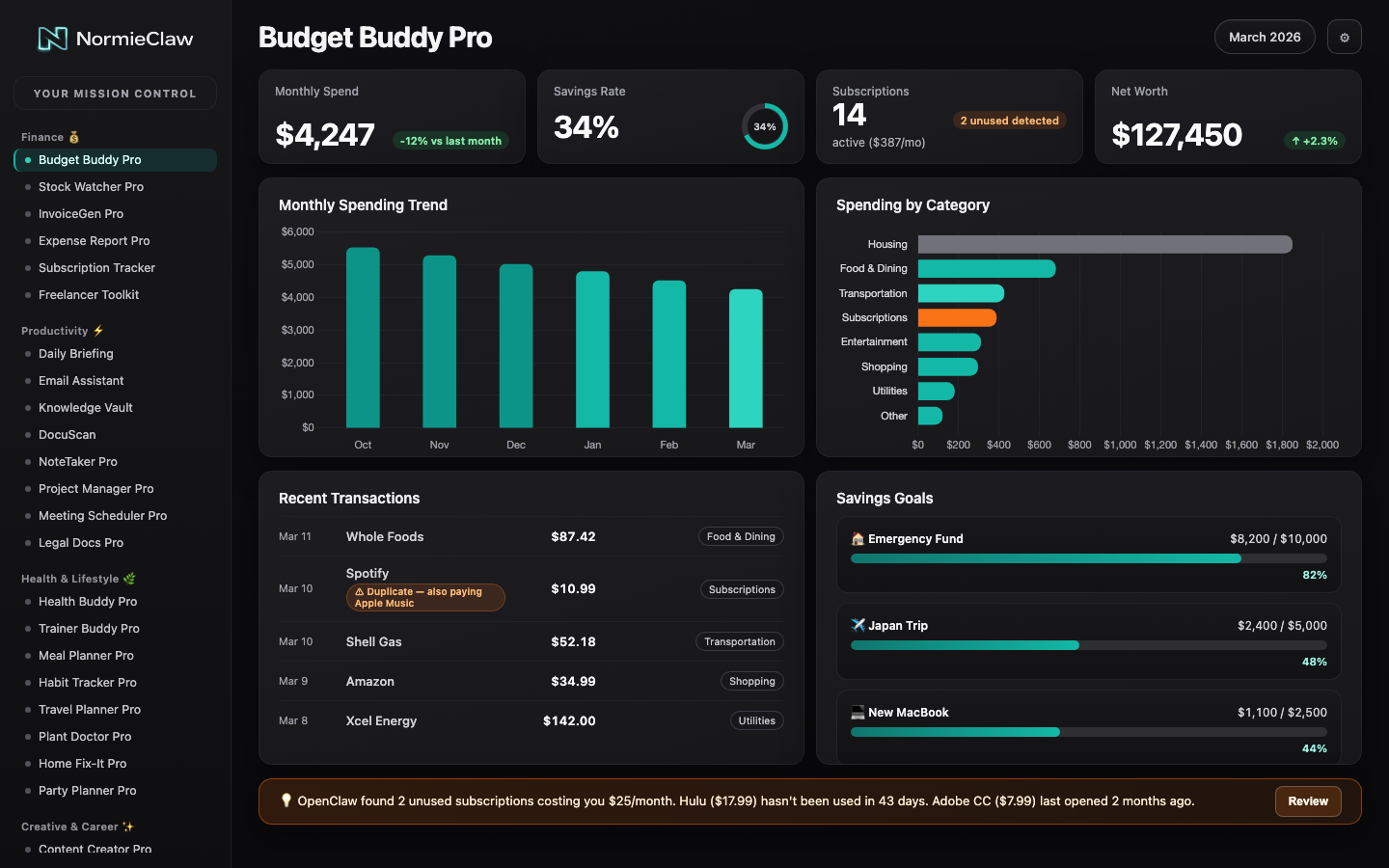
Every NormieClaw tool does its job independently. But the real power is what happens when they all feed into one place. The Dashboard Builder creates a centralized hub — your personal operating system — where every tool's data lives in a single, customizable interface.
1. Tools generate data
Each tool saves its output — budgets, meal plans, workout logs, briefings, scan results — to your database automatically.
2. Dashboard surfaces it
Your dashboard reads from the same database and displays everything in organized widgets — charts, tables, lists, and summaries.
3. You see everything
One URL. One sidebar. Every tool's data at a glance. Fully customizable to show exactly what you care about.
Morning Briefing
Today's curated intelligence, delivered before coffee
Budget Overview
Spending categories, trends, and alerts at a glance
Meal Plan
This week's menu with grocery list, ready for shopping
Workout Tracker
Last session stats and your next programmed workout
Stock Alerts
Your watchlist, triggered signals, and SEC filings
Inbox Summary
Priority-sorted emails with draft replies waiting
Security Status
Scan results — silent unless something needs attention
Health Metrics
Macros, weight trends, and supplement tracking
Notes & Docs
Meeting summaries, action items, and searchable archive
Your dashboard isn't hosted on our servers. It deploys to your own Vercel account (or wherever you choose). Your data stays in your own database. No vendor lock-in, no monthly platform fees, no usage limits. It's your infrastructure, running your code, displaying your data.
Most NormieClaw tools work out of the box with just OpenClaw. But if you want the full experience — especially the Dashboard — set up these free accounts first. Most users are ready in under 15 minutes.
Already running OpenClaw?
You're already set for most tools. Just drop in the skills folder and go. The accounts below are for the Dashboard and tools that store persistent data.
New to OpenClaw? Get started here — it's free and takes about 10 minutes.
Where your dashboard code lives. Free for personal use.
Deploys your dashboard to a live URL in minutes. Vercel works seamlessly with OpenClaw and has a generous free tier. Netlify and Cloudflare Pages are solid alternatives.
Stores your tool data — budgets, meal plans, workout logs, everything. Both Supabase and Convex have generous free tiers and work beautifully with NormieClaw tools. Pick whichever you prefer.
Many tools deliver content where you already chat — morning briefings, alerts, expense confirmations. Telegram, Discord, WhatsApp, and Slack all work.
Our Dashboard Builder tool walks you through the entire process. Tell OpenClaw "set up my dashboard" and it creates accounts, configures connections, and deploys your dashboard — step by step, with explanations along the way.
Want DDoS protection, SSL, and a CDN in front of your dashboard? Add Cloudflare (free tier). It's not required, but it's a nice upgrade if you're running your dashboard on a custom domain. OpenClaw can help you set it up.
You could, and it would help — once. But next time, you start from scratch. There's no memory of what worked, no saved preferences, no automation. NormieClaw tools give OpenClaw a permanent system: config files, templates, scripts, and structured data that persist. Set it up once, use it every day without re-explaining anything.
31 tools. Dashboard Builder. One install command. OpenClaw handles the rest.